


SharkClean
3.918.42K Reviews
App Specs
- Version
- 6.25.2
- Updated On
- License
- Free
- Downloads
- 1,000,000+
- Developer
- SharkNinja
- Categories
- Lifestyle
- Platform
- Android, iOS
Screenshots
 Analysis by AppCompare
I share my home with other people, so a robot vacuum is useful only when its schedule and settings make sense for everyone. SharkClean is the phone app from SharkNinja for managing a Shark robot vacuum, and its main appeal is practical: it gives me a way to start and organize cleaning without being beside the machine. It is a free lifestyle app, rated for Everyone, with a 3.9 average from around 46,000 ratings and over a million installs. I’d consider it most useful for households that already own a compatible Shark robot and want a simple way to fit its runs around daily routines.
When one robot serves a whole household
The shared-device question is less about the app itself than about how people in a home agree to use one vacuum. A scheduled run can be convenient when the floors are clear and everyone knows it is happening; it can be disruptive when someone is working from home, a child is napping, or a room is in use. I’d treat the schedule as a household routine rather than a private setting: choose a time that suits the people who live there, and leave pathways clear before the robot starts.
For example, if I were heading out for the day, I’d check that the areas I want cleaned are ready, then let the scheduled run happen while the rooms are quiet. If plans change, the useful habit is to check the app before assuming the vacuum will be available or that it has finished. That small bit of coordination matters more in a shared home than adding extra cleaning sessions simply because scheduling is easy.
Setup is tied to the vacuum, not a general cleaning planner
The app’s usefulness depends on having a Shark robot vacuum to connect to. It is not a broad home-cleaning organizer, and it won’t replace a vacuum from another brand or help manage chores that the robot cannot do. The sensible first step is to make sure the robot you own is one you can pair with the app, then use the phone as the control point for that machine. SharkClean has been available since September 8, 2017, and version 6.19.0 supports Android 8.0 or later.
That distinction is worth keeping in mind if you are shopping for a robot as well as an app. I would choose the vacuum based on the home’s floors, layout, and cleaning needs, then regard its companion app as part of that system. If you already use a robot from another maker, downloading this app alone will not add remote control to it; sticking with that robot’s own companion app is the more straightforward choice.
Make routines work around rooms and real life
Scheduled cleaning is most valuable when it solves a repeat problem, not when it simply creates more activity. A regular run while the household is out can keep everyday dust and crumbs from accumulating, while an occasional manual start can suit a day when there has been extra foot traffic. I would avoid setting a routine before I understand which rooms the robot can handle reliably and how often the household actually needs them cleaned.
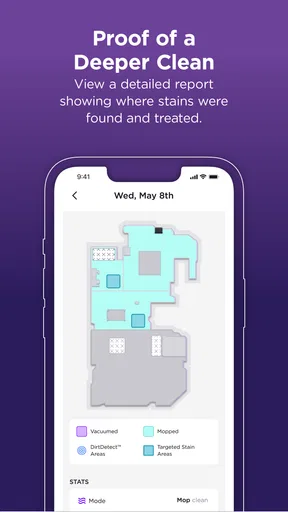
The map and no-go-zone tools can help translate a home’s changing layout into a more deliberate plan. A useful approach is to check the map after a run, make sure it still reflects the space, and use a restricted area for a spot that should stay untouched. This is especially practical for a room with cables, a pet’s bowls, or belongings that are often left on the floor. The trade-off is that the map may need attention after furniture moves; it is not something I would assume remains perfect through every rearrangement.
Worth Reading Before You Choose

EA SPORTS FC Mobile 26 Is a Bigger Football Game, but It Takes Time

Flipboard Shows What News Apps Must Do Beyond the Feed

Switching to Android Auto Means Rethinking Your Driving Routine

Google Calendar Makes a Crowded Week Easier to Manage

Ludo King Makes the Most of the Minutes Between Plans

Baby Panda World Brings Quick Play to Modern Phones, but Its Game Library Feels Busy
Who benefits, and where expectations should stay modest
I’d recommend the app to someone who already owns a Shark robot and wants remote access, scheduled runs, and a way to see cleaning progress. It can be a good fit for a busy household where floors need routine attention and people are comfortable checking a phone to manage the robot. The app is less compelling for someone who prefers to start a vacuum manually, has no compatible Shark machine, or expects an app to replace tidying and supervision.
Compared with the usual alternatives in the robot-vacuum category, the main difference is that SharkClean is designed around Shark’s own robot rather than serving as a universal controller. A competing brand’s companion app may be a better match if its vacuum is already in your home, while a basic manual vacuum may be simpler if you do not need schedules, map visibility, or remote commands. I see the app as a convenience layer, not a reason on its own to buy a particular robot.
Getting Started with SharkClean
First off, setting up the SharkClean app is a breeze. You download it, sync it with your Shark robot vacuum, and boom, you're ready to roll. The app is available for both Android and iOS, so whether you’re team Apple or Google, you’re covered. I found the interface to be pretty intuitive, with a clean design that makes navigation straightforward. No need to be a tech wizard here!
Features That Stand Out
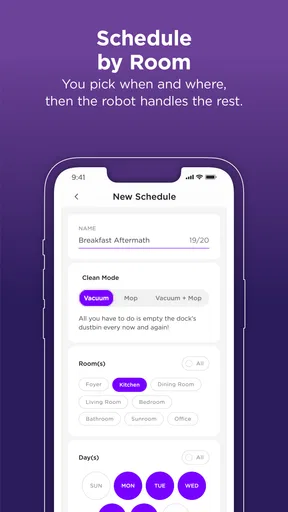
Now, let’s talk about what really makes this app shine. One of the coolest features is the ability to schedule cleanings. You can set up a daily cleaning routine without lifting a finger, which is perfect for those of us who love multitasking. I set mine to run while I’m at work, and coming home to a freshly vacuumed floor is an underrated joy.
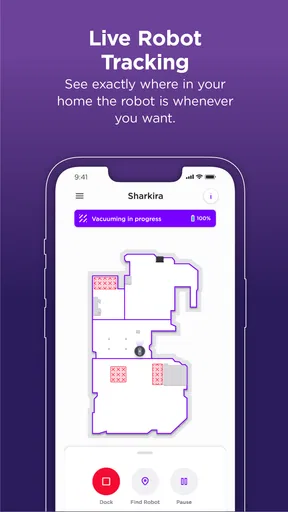
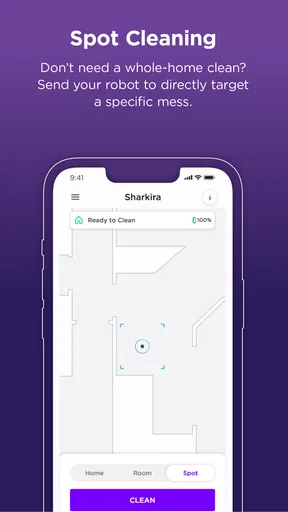
Another feature I loved is the real-time mapping. It’s like having a mini GPS in your vacuum. You can see exactly where your robot has cleaned and where it still needs to go. Plus, you can set no-go zones. So, if you’ve got a room that’s perpetually messy (like my office), you can just mark it off.
Performance and Usability
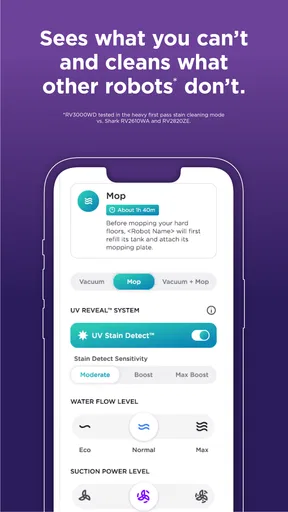
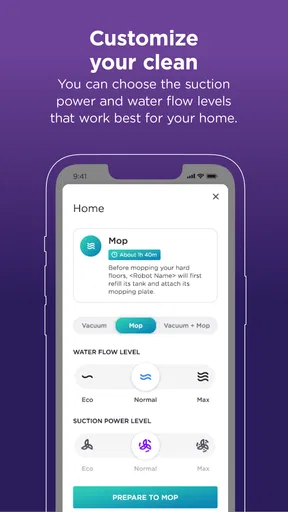
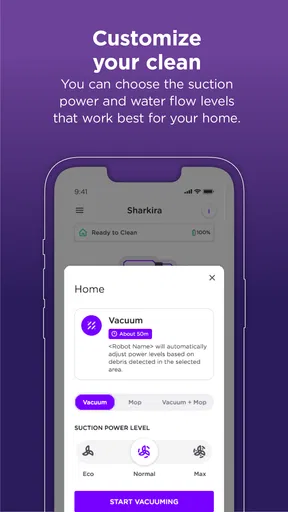
In terms of performance, the app really complements the vacuum’s capabilities. You can adjust suction power and cleaning modes directly from your phone. I experimented with different settings, and it was super handy to switch things up depending on the mess level of the day.
The app’s notifications are also a lifesaver. It sends you alerts when your robot gets stuck or needs maintenance. I had an incident where my vacuum attempted to eat a stray sock, and the app let me know immediately. Talk about efficient communication!
Room for Improvement?
Of course, no app is perfect. While SharkClean is pretty impressive, there are a couple of quirks. Sometimes, the map can be a little off, especially if you move furniture around. It’s not a dealbreaker, but it’s something to keep in mind if you’re constantly redecorating.
Additionally, while the app is generally user-friendly, a more detailed help section could benefit newbies who might need a bit more guidance. A few times, I found myself Googling answers rather than finding them within the app.
Final Thoughts
All in all, the app is a solid companion for your Shark robot vacuum. It makes managing household cleaning a breeze and offers a level of customization that’s hard to beat. If you’re looking to automate some of your cleaning tasks, this app is definitely worth checking out. Just remember to keep an eye on those stray socks!
Ready to give it a try? You can download the app directly from our links for Android or iOS. Happy cleaning!
Sharing access and setting expectations
When a device is used by more than one person, it helps to decide who will handle changes to schedules and cleaning settings. I would not assume that every person in the household needs to adjust the robot independently; one person can manage the routine while everyone else knows when the run is planned. That keeps accidental setting changes and surprise starts less likely, without turning a simple appliance into another source of household debate.
For families, the Everyone content rating is reassuring in the limited sense that the app is rated for a general audience. It does not mean children should be responsible for operating a moving appliance or deciding where it should clean. I’d keep the robot’s physical use and the app’s settings under an adult’s oversight, especially around small objects, pets, and rooms that need to remain undisturbed.
A practical rhythm for avoiding interruptions
One non-obvious benefit of remote control is that it can make a cleaning run easier to fit into a day that changes at short notice. If a room suddenly becomes busy, I would use the app to review the robot’s status rather than letting an automatic routine collide with a meeting or an occupied space. Notifications can also turn a problem into a manageable interruption: if the robot is stuck, I can decide whether to handle it then or wait until I get home.
Still, remote access does not remove the need for a quick floor check. A loose sock, charging cable, or toy can stop a run or create extra work. I’d make a brief pickup part of the routine, especially in shared rooms, rather than expecting the robot to navigate around every item. This is where the app is most helpful: it makes the cleaning plan easier to manage, but the quality of the result still depends on how ready the space is.
My household verdict
SharkNinja’s app has a clear role: it helps people get more convenient use from a Shark robot vacuum through scheduling, map visibility, settings, and alerts. I like that these tools can support a repeatable household routine rather than requiring someone to start every run in person. I also appreciate that the app’s value is easy to judge: if remote control and planned cleaning would make your week smoother, it has a reason to be on your phone.
I would skip it if you do not have a Shark robot, if you would rather clean manually, or if you need a universal smart-home dashboard instead of a companion for one appliance. For everyone else, I’d start with a modest schedule, watch how the map reflects your rooms, and adjust around the people and objects in the home. Used that way, SharkClean feels less like a novelty and more like a practical helper—provided you remember that a robot can tidy floors, but it cannot decide what belongs on them.
Pros
- Easy to set up and connect to devices.
- Intuitive app interface for all users.
- Real-time cleaning updates available.
- Customizable cleaning schedules.
- Efficient battery management alerts.
Cons
- Limited offline functionality.
- Occasional connectivity issues.
- Some features require premium access.
- Limited third-party integration.
- No manual control for spot cleaning.
FAQs for SharkClean
What features does the SharkClean app offer for robotic vacuum control?
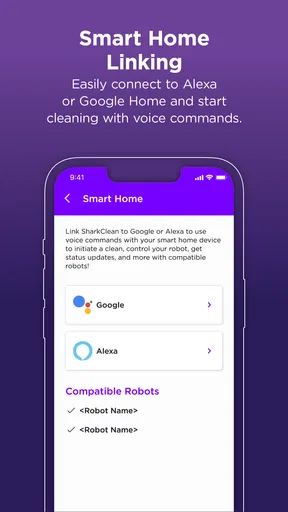
The SharkClean app provides a variety of features to enhance your robotic vacuum experience. Users can schedule cleanings, select specific areas for cleaning, and receive notifications about cleaning sessions. Additionally, the app allows for easy integration with voice assistants like Alexa and Google Assistant, offering hands-free control.
Is the SharkClean app compatible with both Android and iOS devices?
Yes, the SharkClean app is available for both Android and iOS devices. This ensures that users can access all the app's features regardless of their smartphone platform. To get started, simply download the app from the Google Play Store or the Apple App Store, depending on your device.
How user-friendly is the SharkClean app for first-time users?
The SharkClean app is designed with user-friendliness in mind. It features an intuitive interface that guides first-time users through the setup process with ease. The app provides step-by-step instructions and visual cues, making it simple to connect and control your Shark robotic vacuum without any hassle.
Can the SharkClean app be used to monitor the vacuum’s maintenance needs?
Yes, the SharkClean app not only controls the vacuum but also monitors its maintenance needs. Users receive alerts and notifications when it's time to clean the filters or empty the dustbin. This proactive maintenance feature helps ensure the vacuum operates efficiently at all times.
Does the SharkClean app offer real-time mapping and navigation features?
The SharkClean app includes real-time mapping and navigation capabilities, allowing users to see where the vacuum has cleaned and its current location. This feature is particularly useful for customizing cleaning sessions and ensuring comprehensive coverage of your home, enhancing overall cleaning efficiency.


